Why Use Categories?
reciProfity comes pre-loaded with categories to help you organize and analyze your recipes more effectively. Using categories, you can:
- Group and sort recipes for easier reporting
- Set target food cost % or margin % by recipe category
Prefer to use a global food cost % or margin % instead? Read this.
Why Set a Food Cost % or Margin % by Category?
Different types of menu items have different cost expectations. For example, beverages like coffee, cocktails, beer, and soft drinks typically have low food costs (around 10–20%), while wine tends to be higher. Appetizers and desserts, on the other hand, often deliver high profit margins.
By setting category-specific targets in your Category settings, you can balance your overall food cost. For instance, if you maintain a 40% food cost target for entrées but keep appetizers and desserts at 15–20%, selling enough of those high-margin items can help bring your average food cost down to your overall goal—say, 30%.
Of course, every business is different, so your targets should reflect your unique strategy. For more guidance, check out our article on menu costing strategies.
Primary vs. Secondary Categories
Each recipe can be assigned:
- A Primary Category – used to calculate your target food cost or margin
- An Additional (Secondary) Category – used for grouping by service period (e.g., brunch, lunch, dinner), cuisine type, or dietary needs (e.g., vegetarian, vegan, gluten-free)
How To Set Up and Manage Categories
To get started:
- Click the hamburger menu in the top left corner.
- Select The Optimizer.
- Click Manage Categories.
- From here, you can create, edit, and assign categories to recipes.
How Categories Affect Food Cost Calculations
When you assign a recipe to a Primary Category, reciProfity uses that category’s target food cost % or margin % to evaluate performance. Let's say the Primary Category is “Dessert” with a target food cost of 28%.
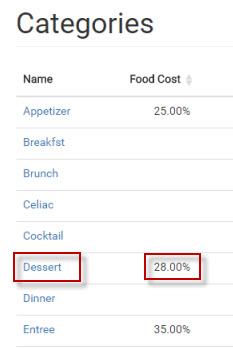
That 28% will be used to calculate the recipe’s Target Food Cost %. If your Actual Food Cost % exceeds the target, it will be highlighted in red.
You can then go back and either increase the selling price, modify the ingredients, or a combination of both actions.